

How to get your auDA domain password
You need the domain password to move a .au domain to another provider. There are two ways to get it: ask the provider that manages the domain now, or go around them with auDA's own recovery tool. Both send the code to one place only, the registrant contact email on the record. So that is the first thing to check.
Last updated
The short answer
First look the domain up at whois.auda.org.au and confirm you can read the Registrant Contact Email. Then either ask your current provider for the domain password, or go to pw.auda.org.au, enter the domain and your name and press Recover. auDA emails a single-use link to the registrant contact address. The link shows the domain password, the registrar of record, the creation date and the expiry date. It cannot be sent to any other address.
Why it only goes to one email address
The code lets a domain be moved, so auDA will only release it to the holder. Its way of knowing the holder is the registrant contact email on the record. Anyone can ask the recovery tool to send the code, but it only ever lands in that one mailbox. This protects you when the address is right and locks you out when it is not.
The two ways
Ask your provider
Email or call the registrar or reseller that manages the domain. Many have a button for it in the account. They send the code to the registrant contact email.
Use the auDA recovery tool
Go to pw.auda.org.au. No account and no fee. It works even if your provider is slow, unhelpful or gone.
Who this is for
- Businesses moving a .au domain to a new provider.
- Owners whose provider or web designer is not responding.
- Anyone who wants to know the domain's expiry date, which the public record does not show.
How WaTo can help
- We check the record and the contact email before a move, so the code arrives first time.
- We handle the domain transfer and the email and website settings that go with it.
- When the contact email is dead, we work through the provider and registrar to get it updated.
Using the auDA recovery tool
- Check the email address first. Run the WHOIS lookup and read the Registrant Contact Email. If nobody in the business can open that mailbox, fix that before anything else (see below).
- Open the tool. Go to pw.auda.org.au.
- Fill in both boxes. Type the domain without www or https, for example yourbusiness.com.au, and your own name under Requestor Name. Tick I'm not a robot and press Recover.
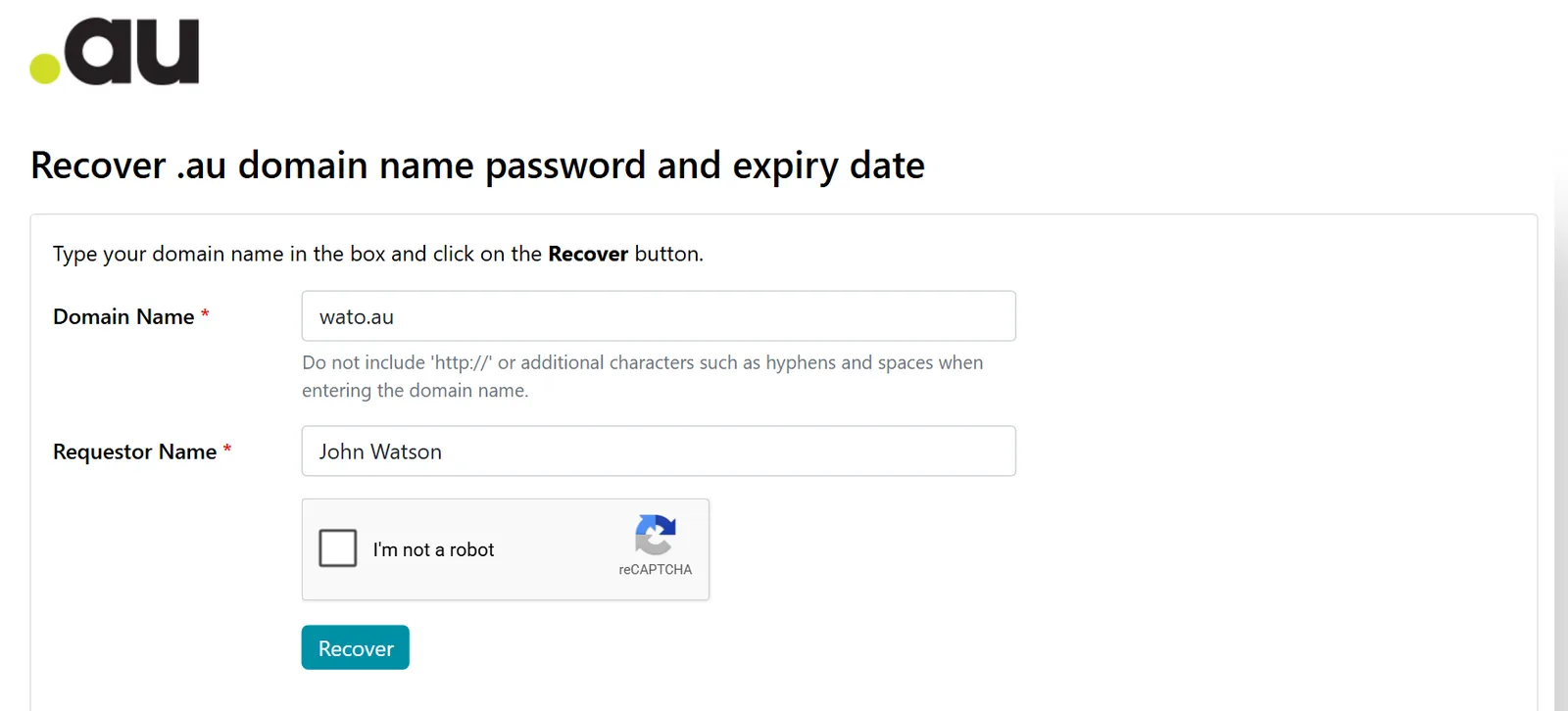
The recovery tool at pw.auda.org.au. Both boxes are required. The code is emailed to the registrant contact address, not shown on screen. - Open the email. auDA sends a single-use link to the registrant contact address. Check the junk folder if it is slow to appear.
- Copy everything down. The link works once. The page shows the domain password, the registrar of record, the creation date and the expiry date. Save all four.
- Pass the code to the new provider only. Give it to the provider you are moving to and nobody else.
Getting the password: common problems
The email never arrived. What went wrong?
Almost always the registrant contact email on the record is not the address you are watching. Look it up in WHOIS. It may be your old provider's address, a former staff member's, or a mailbox that no longer exists.
The registrant contact email is out of date. How do I change it?
Through your domain provider, the registrar or reseller named on the record. auDA cannot redirect the email to another address. The provider will want to be satisfied the request comes from the registrant, so have your ABN details and ID ready.
The contact email belongs to my old IT provider or web designer. Now what?
Ask them to update it to your address, or to forward the code. If they will not, go to the registrar of record shown in WHOIS with evidence that you are the registrant, and to auDA if that fails. If they are also the registrant, read do you own your domain first.
Is the recovery tool safe? Anyone can use it on my domain.
Anyone can press the button, but the code only goes to the registrant contact email. A stranger gains nothing. If you get a recovery email you did not ask for, nothing has been taken, though it is worth asking who is interested in your domain.
Do I need the password to renew or to change DNS settings?
No. Renewals and day to day changes are done in the provider's account. The domain password is for moving the domain to another registrar.
How long does the transfer take once I have the code?
auDA says that once approved a transfer can take up to three days to take effect. Email and the website keep running if the DNS settings are carried over properly.
How WaTo can help with this
Guides on this topic
- What is the auDA domain password?
- How to use the auDA WHOIS lookup
- Has your IT put you at risk? Check who holds your domain
- The risks hiding in your domain's WHOIS record
Sources & references
WaTo Consulting. Last reviewed 2026-11-21. Review when auDA changes its password recovery tool.
Stuck waiting on a code that never comes?
Tell us the domain name. We can look at the record and work out where the email is going.
Mon to Fri, 8:30am to 5pm